The Mail MergeComeback
Like vinyl records, scrunchies, and 90s nostalgia, mail merge refused to fade away. Here's the story of how a 1990s office staple reinvented itself for the e-signature era.

Let's Talk About Mail Merge
If you worked in an office in the 1990s, you remember the ritual. Open Word. Click Tools → Mail Merge. Connect to a "data source" (read: a janky Excel file your coworker emailed you). Watch Clippy pop up with unsolicited advice. Print 200 letters that all said "Dear [FIRST_NAME]," because you forgot to set up the merge fields correctly.
It was beautiful. It was terrible. It was peak office productivity culture, right there alongside chain faxes and the sound of a dot matrix printer at 7am.
And then, like Friends leaving NBC and everyone migrating to Gmail, mail merge kind of… disappeared. Not literally (Word still has it buried six menus deep) but culturally. Nobody was excited about mail merge anymore. Until now.
A Brief History of Mail Merge
From floppy disks to cloud-native batch processing
WordPerfect introduces mail merge to DOS users. Office admins everywhere rejoice (briefly).
Floppy disks
Microsoft Word 6.0 ships with the Mail Merge Helper wizard. Clippy is lurking nearby.
Dial-up internet
Mail merge peaks. Every HR department prints 500 personalized holiday cards. Toner budgets questioned.
Tamagotchi era
Gmail launches. Everyone decides email templates are "good enough." Mail merge fades from consciousness.
iPod Mini
Dark ages. "Mail merge" becomes a punchline. "Just use a CRM" becomes the answer to everything.
Slack replaces email (or so we thought)
The comeback. Bulk signature sending combines mail merge with e-signatures, and it actually works.
AI-powered everything
The Dark Ages (2005–2023)
For nearly two decades, "mail merge" was the thing your dad asked you about at Thanksgiving. "How do I do that mail merge thing in the new Word?" It had the same energy as asking how to program a VCR.
The market responded with a thousand SaaS tools that did pieces of what mail merge did: CRMs for sales teams, marketing automation for newsletters, DocuSign for one-off signatures. But nobody unified them. You could send 500 emails or sign 1 document. Never both. Never at scale.
Meanwhile, the people who actually needed mail merge (legal teams, HR departments, operations managers) were still exporting CSVs and running Word macros. In 2023. Like it was 1997.
The Renaissance (2024–Now)
Here's the thing about comebacks: they never look exactly like the original. Vinyl sounds the same but now you buy it at Urban Outfitters. Top Gun: Maverick was somehow better than the first one. And mail merge? It grew up.
Modern bulk signature sending is what mail merge always wanted to be: upload a spreadsheet, map your data to a document template, and send personalized copies to hundreds of people. Except now each copy is a legally binding e-signature request, not a letter your recipient throws in the recycling bin.
No ODBC connections. No printer jams. No Clippy. Just a wizard that works like it's 2026 (because it is).
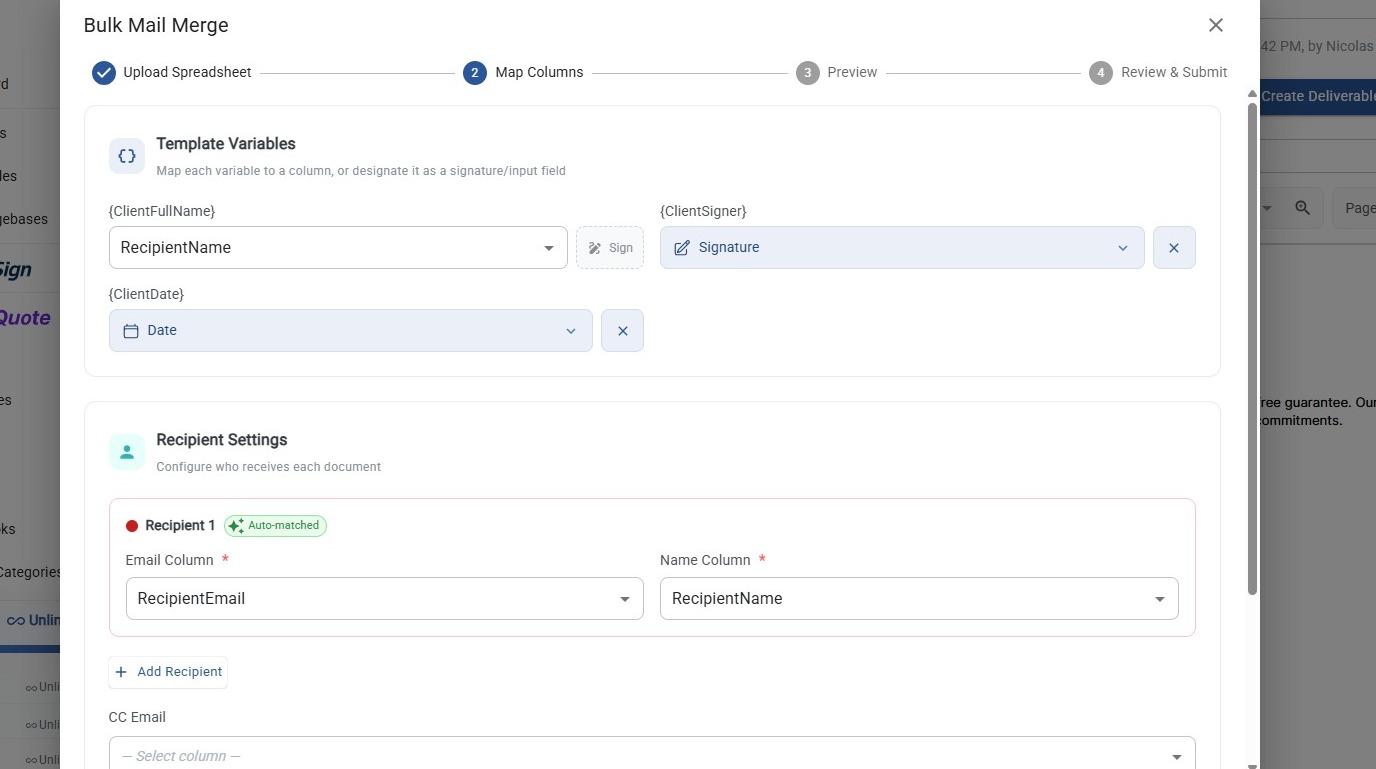
The Bulk Send wizard, mapping spreadsheet columns to template variables
Mail Merge, Evolved
Everything you loved (spreadsheet + template = personalized docs) minus everything you hated
Spreadsheet Upload
Drag and drop a CSV or Excel file. No ODBC drivers, no "data source" wizards, no tears.
Smart Column Matching
Auto-matches your columns to template variables using fuzzy matching. No manual field-by-field setup.
Live Preview
See every merged document as a PDF before sending. No more "Dear {FirstName}" disasters.
Batch Submission
Submit hundreds of personalized documents for signature in one click. Background processing handles the rest.
Why This Matters
The original mail merge solved a real problem: personalization at scale. But it stopped at printing. Modern bulk mail merge closes the loop. Generate, send, and get signed, all from one workflow.
And the economics are simple: 1 credit per document, regardless of how many signers. Send 100 NDAs to 100 employees? 100 credits. Each NDA has 3 signers? Still 100 credits. Clippy could never.
Then vs. Now
| Word 6.0 (1993) | TurboDocx (2026) | |
|---|---|---|
| Data source | ODBC, dBASE, "that Excel file Greg emailed" | Drag-and-drop CSV/XLSX |
| Matching | Manual, field-by-field, pray nothing breaks | Fuzzy auto-match with manual override |
| Preview | "View Merged Data" button (sort of worked) | Live PDF preview, row-by-row navigation |
| Output | Printed letters (RIP trees) | E-signature requests with tracking |
| Recipients | Whoever opens their mailbox | Up to 10 signers per doc, color-coded |
| Assistant | Clippy (unsolicited) | A wizard that actually helps |
Ready to Mail Merge Like It's 2026?
Upload a spreadsheet, map your variables, preview every document, and send hundreds of signature requests in minutes. No Clippy required.