
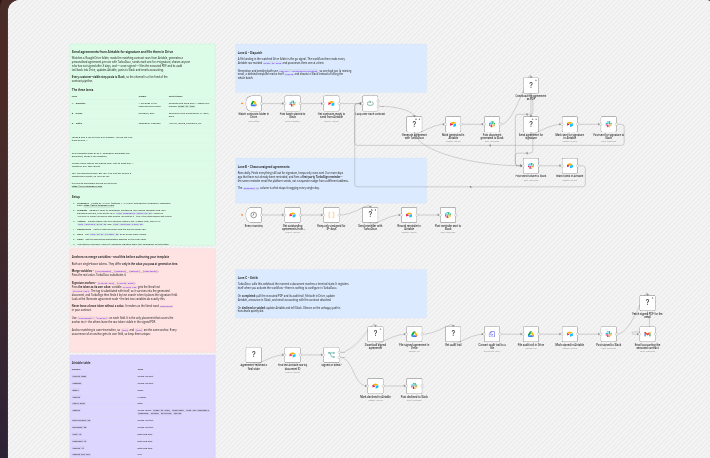
The full workflow on the n8n canvas, three lanes and all. Open the interactive version on n8n.
Why this workflow is different: across the n8n template library, roughly 17 e-signature templates exist, and every one calls its signing vendor through a generic HTTP Request node. None generates a personalised contract body per Airtable row, which is the whole point of this send, chase, and file pipeline.
How do you automate e-signatures from Airtable in n8n? To run n8n e-signature from Airtable, point one workflow at your contract rows: it reads each row marked ready to send, generates a personalised agreement with TurboDocx, sends it for signature, chases anyone unsigned after three days, and files the executed PDF back into Google Drive once every party has signed.
That whole loop lives in a single published template. It is 31 functional nodes, 3 independent triggers, and 6 sticky notes, split into three lanes that never step on each other. And because every customer-visible step posts to Slack, your channel becomes a live feed of the pipeline: what went out, what got chased, and what came back signed.
You can import it, wire up your credentials, and run it. Everything below explains how it fits together so you can adapt it to your own contract data.
How the workflow works, step by step
- 1
A file lands in the watched Google Drive folder
Dropping a file into the folder is the go signal. The dispatch lane wakes up and reads every Airtable row that is marked ready to send.
- 2
TurboDocx generates a personalised agreement per row
Each row becomes its own contract. Row values fill the merge variables, so the body of the document is different for every recipient, not a shared PDF with a name swapped in.
- 3
Each agreement is sent for e-signature
The same TurboDocx credential that generated the document sends it for signature and drops a signature anchor at the exact spot each party needs to sign.
- 4
Anyone unsigned after three days gets chased, once
A daily schedule at 09:00 finds every contract that has been out for three or more days without a signature and sends one reminder. Exactly one, so nobody is nagged every morning.
- 5
The executed PDF and audit trail are filed back to Drive
Once every party has signed, the settle lane pulls the executed PDF and its signature audit trail from TurboDocx and files both back into the same Drive folder.
- 6
Airtable, Slack, and accounting are all updated
The matching Airtable row flips to signed, the result posts to Slack, and accounting gets an email. Every customer-visible step posts to Slack, so the channel is a live feed of the pipeline.
Three lanes, three independent triggers
The template splits cleanly into three lanes. Each has its own trigger, so dispatching a new batch, chasing a stale one, and settling a completed one all run on their own clock without waiting on each other.
| Lane | Trigger | What it does |
|---|---|---|
| Dispatch | A file lands in the watched Drive folder | Reads every Airtable row marked ready to send, generates a personalised agreement per row with TurboDocx, and sends each one for signature. |
| Chase | Schedule, daily at 09:00 | Reminds anyone left unsigned for three or more days, exactly once, then leaves them alone. |
| Settle | TurboDocx webhook, on signature complete | Archives the executed PDF and audit trail to Drive, updates Airtable, announces in Slack, and emails accounting. The webhook self-registers with TurboDocx on activation. |
Signature anchors versus merge variables
This is the one detail worth getting right before you run the template. Anchors and merge variables look identical in the document. They are both single-brace tokens, and they differ only in the value you pass at generation time.
Merge variable
A token like {clientName} or {amount} gets the real value. The variable clientName is set to the actual name, so the token is replaced by that text in the finished document.
Signature anchor
A token like {client_sig} or {client_date} gets the token as its own value. The variable client_sig is set to the literal text {client_sig}, so it survives into the document and TurboSign finds it by text search.
The rules that keep it clean
- Never leave a brace token without a value, or it renders as the literal word undefined.
- Use placement replace so the token position is where the field lands.
- Keep anchors unique. Matching is case-insensitive, so avoid collisions.
Why one credential, not three
The workflow generates the document, sends it for signature, chases it, and retrieves the executed copy plus the audit trail, all through a single TurboDocx credential. That is the part that changes how the whole thing feels to build and to run.
A signature-only vendor cannot vary the document body per row. That is why comparable n8n flows bolt a document step like Google Docs or Slides in front of the signature step, and even then they still cannot produce a true per-recipient contract. One credential that both writes the agreement and signs it is what lets each Airtable row turn into its own personalised document. The same API and SDK runs this in n8n or in your own code.
Import it and run it today
The full template is published on n8n, ready to import. Wire up your Airtable, Drive, and TurboDocx credentials and send your first batch.
Open the live n8n templateFrequently asked questions
Can n8n chase unsigned contracts automatically?
Yes. A scheduled trigger runs once a day at 09:00 and looks for any contract that has been out for signature for three or more days without being signed. It sends a single reminder to that recipient, exactly once, so nobody gets nagged every morning. The chase lane is independent of the send lane, so reminders keep going out even while new contracts are still being dispatched.
Where do signed PDFs get filed?
Once every party has signed, the settle lane retrieves the executed PDF and its signature audit trail from TurboDocx and files both back into the same Google Drive folder the workflow watches. It also updates the matching Airtable row to signed, posts the result to Slack, and emails accounting, so the record lives in Drive, Airtable, and your channel history at the same time.
Do I need a separate document generator for n8n e-signature?
No. TurboDocx generates the document, sends it for signature, chases it, and returns the executed copy through a single credential, so you do not bolt a separate document generator onto a signature-only vendor. A signature-only tool cannot vary the contract body per row, which is why comparable n8n flows have to stitch Google Docs or Slides in front of the signature step and still cannot produce a true per-recipient agreement.
How does the workflow know which Airtable rows to send?
The dispatch lane fires when a file lands in the watched Google Drive folder, then reads every Airtable row marked ready to send. Each of those rows becomes one personalised agreement, generated with the row values as merge variables, and each one is sent for signature. Rows that are not marked ready to send are left untouched until they are.
What is the difference between a signature anchor and a merge variable?
Both are single-brace tokens, and they differ only in the value you pass at generation. A merge variable like {clientName} or {amount} receives the real value, so the token is replaced by the actual text. A signature anchor like {client_sig} or {client_date} receives the token as its own value, meaning the variable client_sig is set to the literal text {client_sig}, so it survives into the finished document and TurboSign finds it by text search. Never leave a brace token without a value or it renders as the literal word undefined.
Related Resources
n8n E-Signature Automation Workflows
The hub for every way to run generation, signing, and chasing on n8n, with the patterns each workflow shares.
TurboSign
The signing engine behind the workflow: anchors, audit trails, and completion webhooks in one product.
API and SDK
Generate, send, chase, and retrieve executed documents from one credential, in n8n or your own code.
One credential, from draft to signed and filed
Generate, send, chase, and archive every contract from Airtable without stitching three vendors together.