
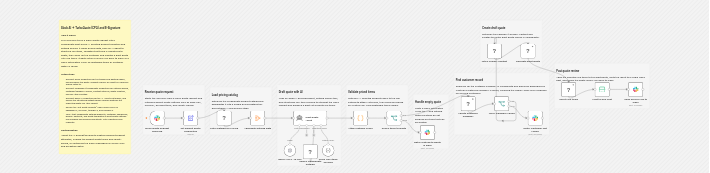
The full workflow on the n8n canvas. Open the interactive version on n8n.
Why this workflow is different: on n8n, a search for "quote" returns about 36 templates and "proposal" about 52, but none turns a plain-English Slack request into a priced draft quote with an AI agent. This one does, and the AI only ever picks products, never sets a price.
How do you generate a CPQ sales quote from Slack with n8n? You mention a bot in Slack with a plain-English request, an AI Agent maps the products to real SKUs in your TurboQuote price book, and this n8n quoting workflow builds a priced draft quote and posts a review link back to the channel. The AI only picks products; a code step attaches every price straight from your catalog.
That is the whole pitch for n8n CPQ quote automation: your reps stay in Slack, the quote lands in TurboQuote as a draft, and nobody has to open the quoting tool to spin up a first pass. The AI never invents a number, because it is structurally prevented from doing so.
The full n8n TurboQuote template is live and free to copy. It is 16 functional nodes plus one AI agent with three sub-nodes, and you can import it in a couple of minutes.
How it works, in four steps
The workflow moves through four stages: Listen, Match, Find, and Create. Each one is a small, readable cluster of nodes, so the whole thing is easy to audit and adapt.
Step 1: Listen
Catch the request in Slack
A Slack Trigger fires on an app_mention, so a rep can type something like "@quotebot I need a quote for Acme Corp: 25 Pro licenses and an onboarding package" right in the channel. A single "Set quote defaults" config node stamps the request with your currency, term length, validity window, and app base URL.
Step 2: Match
Map plain English to real SKUs
The workflow fetches your catalog and aggregates it, then an AI Agent reads the request and uses the TurboDocx node as a catalog-search tool to pick products. A structured output schema forces the agent to return only { customerName, items:[{ productId, quantity }] }. A code step then attaches each real list price straight from the catalog, so the AI picks products but never sets a price.
Step 3: Find
Look up the customer
The workflow finds the customer company by name. An IF node checks whether it exists: if found, it gets the primary contact and moves on; if not, it posts a clear "not found" message back to Slack so the rep can fix the name or create the company first.
Step 4: Create
Build the draft and post the link
Finally it creates a draft quote in TurboQuote, adds every matched line item with its catalog price, and posts a .../turboquote/<id>/configure review link back to the Slack channel. The quote is a draft the sales team reviews, never something sent to the customer automatically.
Why the AI never sets prices
This is the part that makes n8n AI quoting safe to put in front of a sales team. The obvious fear with an AI-generated quote is that the model quietly invents a price. This workflow makes that impossible by construction, not by trusting the model to behave.
The AI Agent is constrained by a structured output schema that lets it return only a productId and a quantity for each line item. It has no field in which to put a price. A separate code node then joins those product IDs to the catalog the workflow fetched a moment earlier and stamps each line with its real listPrice.
So a hallucinated price can never reach the quote. The worst thing that can happen is a product the AI cannot match to a SKU, and that is reported right back in Slack instead of being guessed. The guardrail is not a warning in the prompt, it is the shape of the data the agent is allowed to return.
What you need to set it up
Setup is short. Three credentials, one config node, and a catalog that already reflects how you sell.
Install the community node
Add @turbodocx/n8n-nodes-turbodocx on self-hosted n8n. It is not yet on the n8n Cloud verified list, so this template runs on a self-hosted instance.
Add a TurboDocx API credential
A standard org API key is enough. No admin key and no webhooks are required for this quoting workflow.
Add an OpenAI credential
The AI Agent runs on OpenAI out of the box, and it is swappable for Claude or Gemini if you prefer a different model.
Create a Slack app
Subscribe to the app_mention event and grant chat:write so the bot can read requests and post the review link back.
Edit "Set quote defaults"
Set appBaseUrl, currency, termDays, and validDays once. This single config node drives every quote the workflow creates.
Prepare TurboQuote first
Your products need a list price and billing frequency in the catalog, and the customer company must already exist with at least one contact. The template looks them up, it does not create them.
If you would rather wire quoting into a tool that is not n8n, the same catalog, customer, and quote operations are available through the TurboDocx API and SDK, and the CPQ engine itself lives in TurboQuote.
Frequently asked questions
Can I create a sales quote from Slack with AI?
Yes. This n8n CPQ template lets a rep ask for a quote in Slack in plain English, like "@quotebot I need a quote for Acme Corp: 25 Pro licenses and an onboarding package", and get back a priced draft quote with a review link. An AI Agent reads the request, maps the products to real SKUs in your TurboQuote price book, and the workflow creates the draft for you without anyone opening the quoting tool.
Does the AI make up prices?
No. The AI Agent is constrained by a structured output schema that lets it return only a productId and a quantity for each line, never a price. A code node then joins those product IDs to your fetched catalog and stamps each line with its real list price. A hallucinated price can never reach the quote. The worst case is a product the AI cannot match, which is reported back in Slack rather than guessed.
Do I need TurboQuote set up first?
Yes. The template looks up your data rather than inventing it, so a few things need to exist first. Your products must be in the TurboQuote catalog with a list price and a billing frequency, and the customer company must already exist with at least one contact. The workflow finds the company and its primary contact, it does not create them, and it will tell you in Slack if it cannot find a match.
Is the review link safe to send to a customer?
No, and that is by design. The .../turboquote/<id>/configure link the workflow posts is an internal, login-gated review link for your sales team, not a public customer link. This template stops at the draft. The customer-facing signing link is emailed separately when the quote is later sent from TurboQuote, so a rep always reviews the draft before anything reaches the customer.
Which AI model does the n8n quoting workflow use?
The AI Agent runs on OpenAI by default, wired as one agent with three sub-nodes: the model, a catalog-search tool, and a structured output parser. Because the agent only picks products and never sets prices, the model choice is low risk, and you can swap OpenAI for Claude or Gemini without changing the pricing guardrail that keeps every line tied to your catalog.
Related Resources
n8n automation workflows
The hub guide to building document and signature automation with n8n and TurboDocx, from simple contracts to multi-party approvals.
TurboQuote
The CPQ product behind this workflow: a price book, catalog products, and draft-to-signed quotes your sales team controls.
API and SDK
The same quoting, catalog, and customer endpoints the n8n node calls, ready to wire into any tool your team already uses.
Quote from Slack in a couple of minutes
Import the live n8n template, add your credentials, and your team can draft a priced quote without leaving the channel.